
How to Use UX Design to Improve Your SEO
In the pursuit of improving your SEO metrics, you have built a solid backlink profile and optimized your keyword list. But even after this, your website isn't ranking as much as you'd like. The issue could most likely be your website's UX design.
Search engines like Google are ranking websites that are more friendly to users higher. And this means that UX is a metric that is tied strongly with SEO.
If your website is properly aligned with modern UX standards, then it is likely to keep users happy. And when users are satisfied, search engines show more of them the same website.
7 UX Design Tips for Improving Your Website Ranking
1. Improving Loading Speed and Performance
The biggest factor in all of UX for a website today is page speed. Simply put, the quicker your website loads, the more chances it has of ranking at the top of searches. There are many ways to improve page load speed.
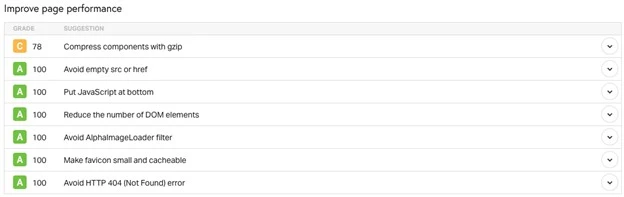
The first thing you need to look at is data-heavy assets on your website - images and video. Ensure that you optimize and compress them, ensuring there are no losses in quality. It is also a good idea to minify all the code on your website, like CSS, JavaScript, and HTML.
If you have a global presence, consider using a content delivery network (CDN) that can accelerate loading speed based on location. It pays to prioritize above-the-fold content through lazy loading. When choosing a service provider, ensure that you choose the fastest one you can afford. Identify and manage render-blocking resources for even quicker load times.
2. Implementing Simple and Intuitive Navigation
Navigation is a key part of the user experience. The core idea of proper website navigation is that it needs to get users where they want to go in as few clicks and as little time as possible. The key here is to ensure that website navigation is straightforward and built to be intuitive to even new users.
Ensure that the menu placement and sizes are consistent across all pages. It is a good idea to have a consistent header menu that is available throughout your website and even when scrolling down. Add clear and descriptive labels for all your menu items. Tool tips come in handy, but ensure you have the delay right.
Having a search functionality feature prominently at the top of the website elevates the functionality and ease of use. For multi-level pages, consider using breadcrumbs to make it less confusing for the user. There should be prominent visual cues for which page they are on the website.
3. Ensuring It Is Mobile Responsive
With a majority of the traffic (62%)majority of the traffic (62%) coming from mobile devices today, it is paramount that all websites need to be optimized for smaller screens. Most brands that are designing or redesigning their website today are opting for a mobile-first approach, and rightly so. The key to designing websites for mobile devices is responsive design.

Responsive CSS frameworks ensure that the website displays correctly regardless of the size of the screen. This is incredibly important when it comes to usability because users will be frustrated with browsing websites that are not built for mobile. Test the website on as many different screens as possible.
When designing buttons or CTAs, ensure they are the right size compared to the desktop version. Keep in mind that users need to be able to click the right element without mis clicking it. Avoid using Flash and other unsupported plugins, which can cause errors during loading. Finally, for mobile devices, compression should be even more pronounced to ensure even quicker loading.
4. Creating Scannable and Engaging Content
For a webpage, especially one that is content-heavy, it is vital that you establish a visual hierarchy to make it easier to read. Ensure that the headings follow the proper order: H1, H2, H3, and so on. This simple change can make a website much easier to read.
Don't be afraid to add in numbered or bulleted lists wherever possible to enhance readability. Included images should be relevant and arranged so it does not interrupt the flow of the page. It is a good idea to bold important parts of the text or links on the page. Content should be split into short paragraphs with enough whitespace between them.
An area that you need to pay attention to is typography. Choose proper fonts and sizes based on the theme of the page and ensure they align with your brand. It pays to highlight quotes or important numbers to add more context to the on-page content.
5. Building Trust With Social Proof
Social proof is a huge factor when it comes to user experience. In fact, 95% of people have stated that reviews influence their buying decisions. For a business in a highly competitive space, testimonials and reviews can be the difference between a sale and none. Ensure that you display client logos and customer testimonials prominently above the fold of a webpage.

Highlight positive user reviews and ratings so people don't miss them when visiting your website. Just adding reviews wouldn't make much of a difference, which is why you should consider case studies. Adding a separate section for comprehensive case studies of all your clients with all the required data can be a good boost to trust and credibility.
Also, add links to customer reviews on third-party platforms like Google Reviews, TrustPilot, and others. Ensure that all reviews and ratings are laid out in a professional manner and do not overcrowd the page.
6. Adding Strategic Internal Linking
Many websites fail to make use of internal linking, instead focusing only on building backlinks. While backlinks are integral to SEO, internal links can be pivotal when it comes to user experience. Ensure that you link across important pages with descriptive anchor text that also includes the right keywords.
It is vital that internal links be contextually relevant to each other. You don't want users clicking a link that has little to do with the previous article and then clicking away from your website. Adding a "Related Posts" section on the side of the page is a great idea to improve your readership and increase dwell time.
If you have a lot of related articles, then consider building topic clusters on your website. These topic clusters are clickable links that take you to blogs that discuss a specific topic. Ensure there is a logical flow to the way you present articles to read for the user.
7. Fixing Common Webpage Errors
Page errors are a factor that completely distracts from the user experience and causes them endless frustration. Imagine getting an error on a link you clicked on when you were searching for important information. The most common error that occurs on a website is a 404 error. This is also known as a "Page not Found" error and could be due to numerous reasons.
Some reasons why 404s occur are because of domain/web address changes or broken links. But the good part about these errors is that they can be identified easily and fixed. Use 301 redirects for pages that are moved or deleted so users don't stare at a blank page. Remember to resolve duplicate content with canonical tags.
Use Google Search Console to find and fix crawl errors on your website. Ensure that all pages are crawlable and indexable. Verify your robots.txt file doesn't block any page and submit your sitemap through Google Search Console.
UX Design & SEO - FAQs
1. Is UX a Vital Ranking Factor?
Yes, UX has been a pivotal ranking factor for search results for quite some time. UX elements like loading performance, interactivity, and visual stability are featured on Core Web Vitals, which highlight how important they are.
2. How Can I Measure SEO Factors on My UX Improvements?
There are several ways you can measure UX KPIs. Core Web Vitals Scores can be measured through the Google Search Console profile. Comprehensive SEO tools like Ahrefs and Semrush can give you statistics like bounce rate, average session duration, pages per session, and conversion rate.
3. How Can I Test My Website’s UX?
The best way to test websites' UX is through real-world tests involving people. There are several tests that can determine UX scores, like usability tests, screen recordings, heatmaps, and user feedback. Each of these is important and provides you with information to paint a full picture.
4. Does It Take Long to See SEO Results From UX Improvements?
The right answer is that it depends. For a more technical fix, like page errors and 404s, you might see immediate results. But for more aesthetic changes, like navigation, changes will occur at a slower but steady pace.
Key Takeaways
● Audit your website regularly to ensure it is free from errors and UX issues.
● Implement simplified navigation that is intuitive and user-friendly.
● Test your website exhaustively on mobile devices to ensure it displays optimally.
● Create small chunks of scannable content to make a page more readable.
● Highlight important elements of social proof, like reviews and ratings, to improve trust and credibility.
● Add internal links within your content to ensure good coverage by both users and crawlers.